

So you’ve heard about Systeme.io and want to give it a try? Smart move! This all-in-one platform can help you build your online business without breaking the bank. The best part? You can start completely free.
Let me walk you through setting up your account in just a few minutes.
Why Systeme.io?
Before we dive in, here’s why so many beginners love this platform. You get email marketing, sales funnels, course hosting, and more in one place. No need to juggle five different tools. Plus, the free plan is actually useful, not just a teaser.
Step 1: Head to the Signup Page
Open your browser and go to Systeme.io. Look for the big blue “Start for free now” or “Sign up free” button. You can’t miss it.

Click that button and you’re on your way.
Step 2: Enter Your Basic Info

You’ll see a simple signup form asking for:
- Your email address (make sure this is a dependable email)
- A password (make it secure but memorable)
- Your first and last name
That’s it. No credit card required. No sneaky upsells at this stage.
Click the signup button and check your email inbox.
Step 3: Verify Your Email
Systeme.io will send you a verification email within seconds. Can’t find it? Check your spam folder.
Click the verification link in that email. Don’t panic, this activates your account and helps to verify that you actually exist.
Step 4: Complete Your Profile
Once you verify your email, you’ll land inside your new dashboard. Don’t feel overwhelmed by all the options yet.
First, let’s finish setting up your profile:
1. Click on your name or avatar in the top right corner
2. Select “Settings” from the dropdown menu
3. Look for the “Profile” section
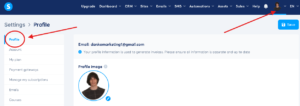
Here you can add:
- A profile picture (optional but nice to have)
- Your business name
- Your time zone (important for email scheduling)
- Your preferred language
Fill out what makes sense for you. You can always change these later.
Step 5: Set Your Email Preferences
While you’re in settings, scroll down to email preferences. This is where you tell Systeme.io how you want to communicate with your future subscribers.
Add your business address. Yes, it’s required by law to include a physical address in marketing emails. You can use your home address or a PO Box if you prefer.
You’re All Set!
That’s it. You now have a working Systeme.io account ready to go.
Take a moment to look around your dashboard. You’ll see options for creating funnels, email campaigns, courses, and more. Don’t worry about understanding everything right now.
What’s Next?
You’re now ready to start exploring and building. I recommend beginning with something simple, like creating your first email list or a basic landing page.
The free plan gives you up to 2,000 contacts, which is perfect when you’re just starting out. This gives you a chance to build something without the added expense.
Remember, every successful online marketer started exactly where you are right now. The difference? They took action and learned as they went.
Your Systeme.io account is your foundation. Now it’s time to build something awesome on it.
Welcome to the world of online marketing made simple!